

Free Google Analytics (GA4) Audit
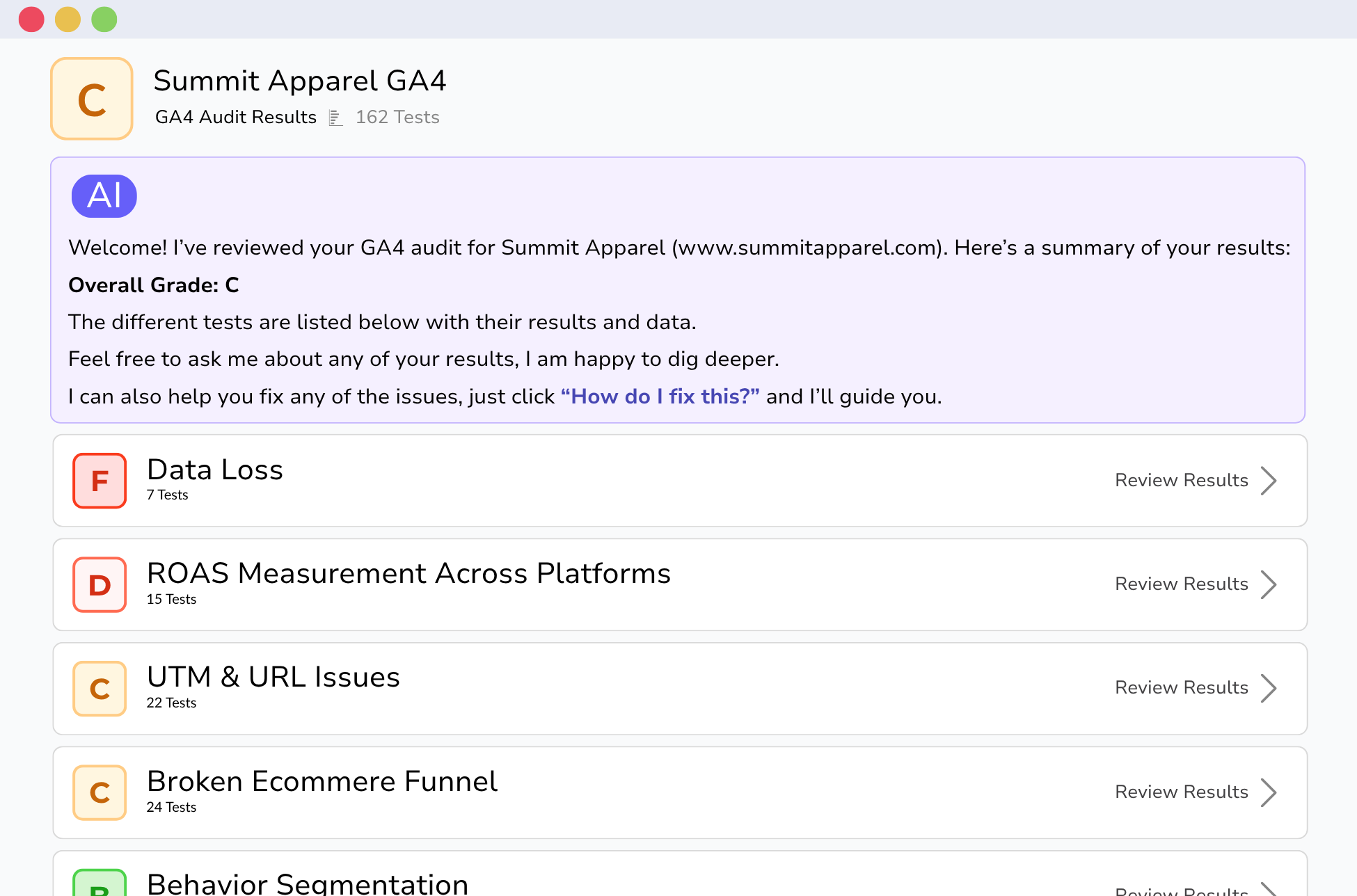
What we check
Get Your Grade in 3 Easy Steps
Sign In with Google
Connect to Google Analytics (GA4). Read-only access, remove anytime.
Run the Audit
In 90 seconds the audit will evaluate over 100 data collection issues.
Review the Findings
See your scores, organized by category, with clear next steps.
Free, but not the usual kind of free.
| RECOMMENDED Free GA4 Audit | Other free tools | Paid agency audit | |
|---|---|---|---|
| Time to results | 90 seconds, instant | 5 minutes to several hours, often emailed later | 2 to 6 weeks |
| Cost | Free, sign in with Google | Free, often with email gate | $3,000 to $20,000+ |
| Run it as often as you want | Unlimited runs across unlimited properties | Usually 1 or 2 free runs, then paid | One-time engagement |
| Tests run | 160, growing monthly | 10 to 30 max | Varies, rarely disclosed |
| AI-powered insights | Yes | Rarely | No |
| Methodology | Public on this page | Hidden | Proprietary |
| Fixes tailored to your business | Yes, AI analyst uses your site, data, and business context | Generic advice | Yes, with senior analyst nuance |
| Strategic guidance and prioritization | Severity rankings only | None | Yes, with implementation help |
Need a full agency engagement?
The free audit is great for finding broken tracking and fixing things yourself. If you want fixes implemented for you, custom data infrastructure, or a senior analyst to interpret what the data means for your specific business, we do that too. Learn more here.
Common questions
Is it really free?
Yes. The audit is free for any account, with no credit card or signup wall. We built it because too many GA4 properties are silently broken, and a no-friction way to find out where you stand made sense for everyone.
What permissions do you need?
Read-only access to your GA4 property. We can't modify settings, change tags, or delete data. You can revoke access from your Google account at any time in two clicks.
How long does it take?
About 90 seconds from connect to results. We pull the configuration and recent data needed to run the checks, score them, and generate the report.
What do I get at the end?
A scored audit across the three categories shown above. Every issue is explained in plain English with a recommended fix, plus AI-generated commentary on the patterns specific to your account. You can share the report link with your team.
What happens after the audit?
Nothing automatic. No drip campaign, no scheduled call. If the report makes you want to talk to us about fixing things, the link to book a call sits at the top of the report. If you want to take the roadmap and run it yourself, that works too.
What about my data?
We only access what's needed to run the audit. Aggregated results may be retained to improve the tool over time, but raw data isn't sold or shared. Running the audit doesn't sign you up for marketing emails.
Do I need to be technical to use this?
No. Running the audit is a few clicks, and reading the report is straightforward. Each issue has a "what this means" and "what to do" explanation. Some fixes require technical work, which we can help with if you want.
What is a GA4 audit?
A GA4 audit is a structured review of your Google Analytics 4 setup that finds the configuration, attribution, and tracking issues quietly distorting your data. A complete Google Analytics audit covers event tracking, conversion setup, channel attribution, ecommerce funnels, data retention, integrations with platforms like Google Ads and BigQuery, and compliance with cookie regulations. The goal is to make sure the numbers in your reports actually reflect what's happening on your site, so the decisions you make from those numbers are sound.
Most teams discover their Google Analytics setup has problems only when a report looks wrong, by which point months of data are already compromised. A regular audit catches the issues early. Our free GA4 audit runs 160+ checks in 90 seconds and works as a thorough Google Analytics checklist you can run as often as you want, across as many properties as you manage. It's the same methodology our analysts use on paid engagements, made available to anyone who wants it.